Tutorial 13 of 15
Practise with the metronome, tempo trainer and click tracks
Beginner 9 min
Use Tonegrid's metronome in any meter, build speed with the tempo trainer, test your inner time with gap clicks and download click tracks for whole songs.
The Practice view is Tonegrid's practice kit. Its Metronome box keeps time in any meter, and the Song map and click track box turns a list of song sections into a click track you can play or download. You can open the view with the Practice tab, with Alt+6, or with the link /app#tab=practice.
Start the metronome
- Click the Practice view tab below the pattern buttons.
- Set the tempo with the Tempo (BPM) slider, the Tempo (BPM, 20–400) field, the −1 and +1 buttons, or by pressing Tap tempo in time with the music (two taps or more).
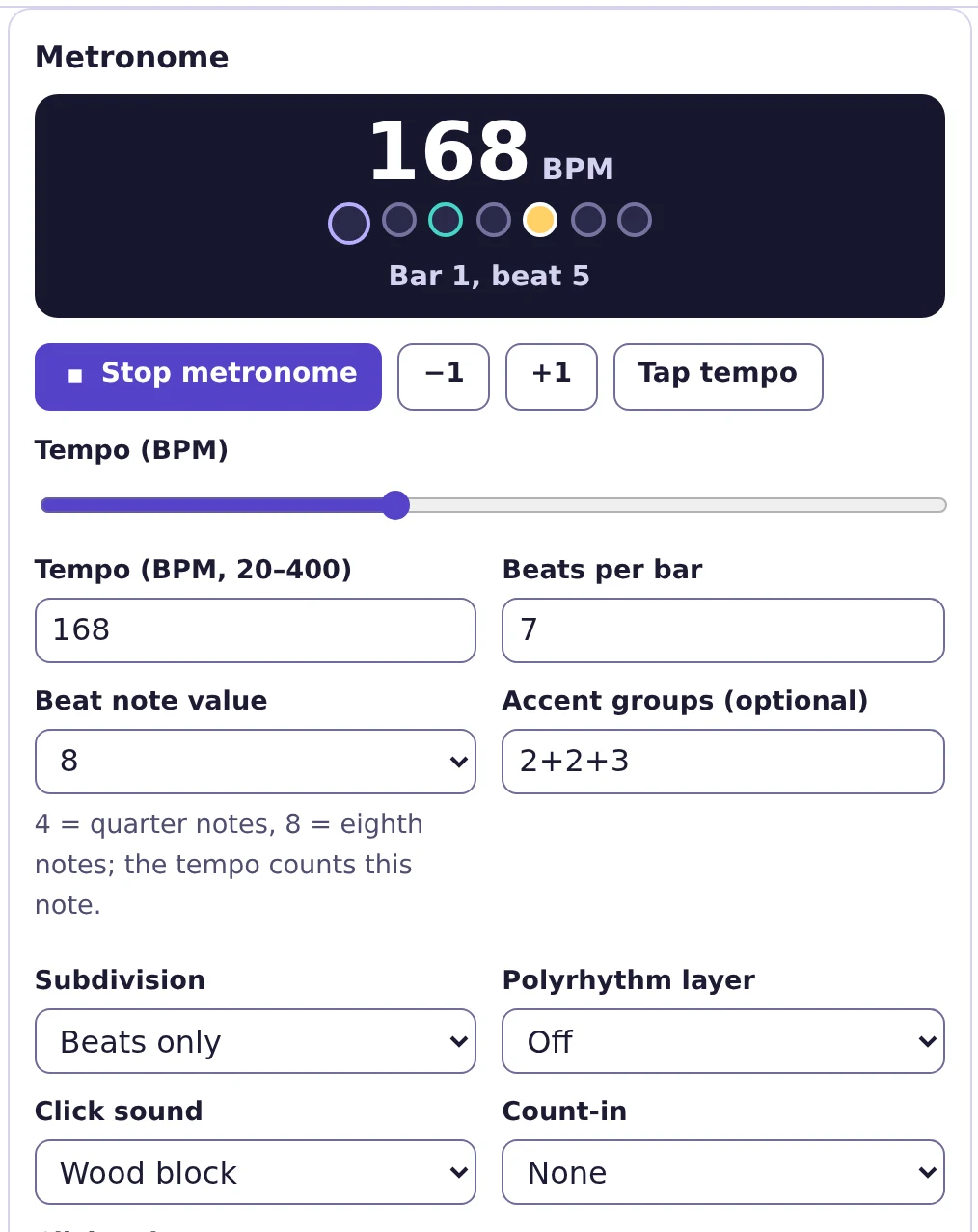
- Press Start metronome. The dark display shows the tempo, one dot per beat and where you are, for example "Bar 3, beat 2". Press Stop metronome to end it.
Nothing sounds until you press the button. The clicks are scheduled ahead on your browser's audio clock, so they stay steady even when the page is busy. Only the lighting of the dots uses ordinary page timers.
You can change every setting while the metronome runs: the next bar uses the new values.
Meter, accents and subdivisions
- Beats per bar and Beat note value make the meter. The tempo counts the beat note value, so 7/8 at 168 means 168 eighth notes per minute.
- Accent groups (optional) splits the bar, for example
2+2+3in 7/8 or3+3+2in 4/4 counted as eighths. The first beat of the bar gets the strongest click and the first beat of every group a softer accent; the dots show the groups too. - Subdivision adds quiet clicks between the beats: eighths, triplets or sixteenths.
- Polyrhythm layer adds a second, lower click that divides the whole bar evenly. With 2 beats per bar and 3 clicks per bar you hear three against two; with 4 beats and 3 clicks, four against three.
- Click sound offers a wood block, an electronic beep or a soft tone. Count-in plays one to four plain bars before the trainer starts.
- Visual only (no sound): the beat lights up silently is useful in a quiet room or for deaf and hard-of-hearing musicians.
Build speed with the tempo trainer
The Tempo trainer fieldset changes the tempo for you:
- Set the starting tempo in the metronome.
- In Change by (BPM, 0 = off) enter how much faster each step should be, for example 4.
- In Every … bars choose how long each tempo lasts, and in Until (BPM) the goal.
- Press Start metronome. Every few bars the tempo goes up until the goal is reached, and screen readers hear "Tempo now 104 BPM".
The same fieldset has two inner-time drills:
- Gap click plays a number of bars with clicks, then mutes a number of bars, and repeats. Keep counting during the silent bars; when the clicks come back, you hear whether you rushed or dragged. The beat dots keep moving with a dashed outline during muted bars.
- Random mute (% of bars) mutes bars at random. The first bar always clicks.
The note below the fields sums up what is active.
Click tracks for whole songs
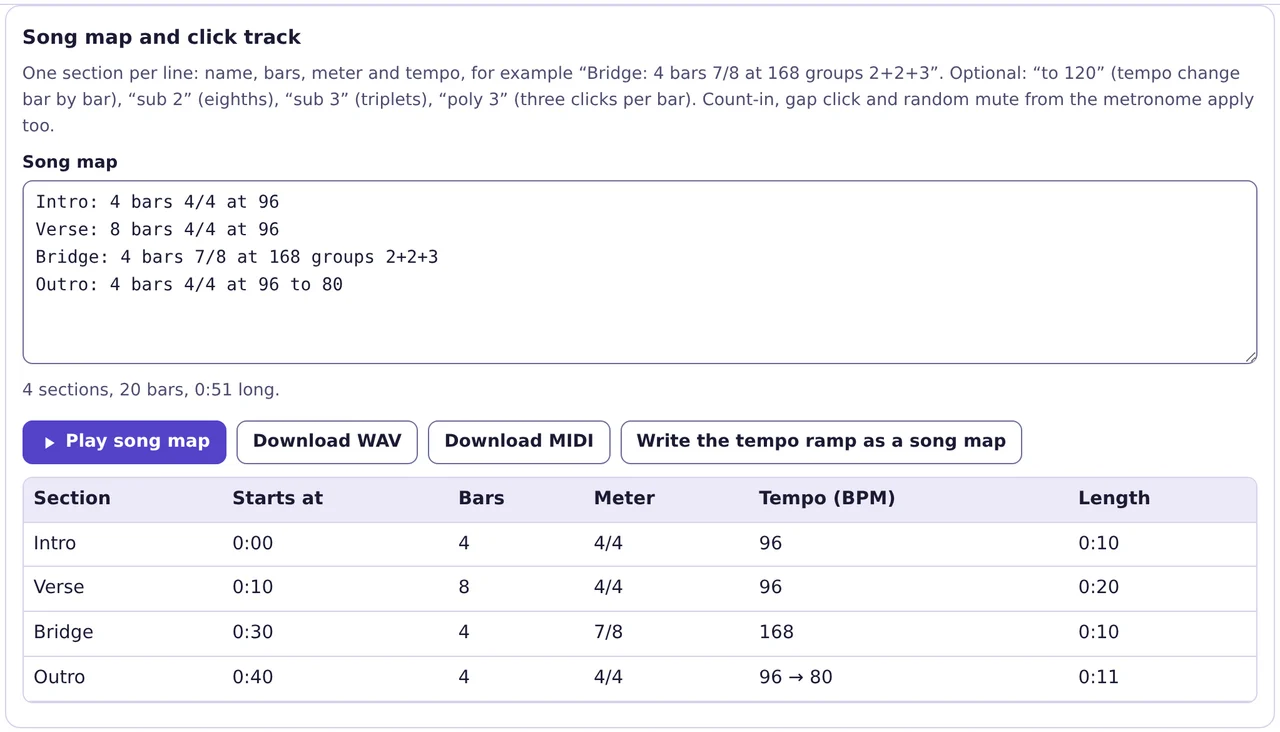
The Song map and click track box takes one section per line:
Intro: 4 bars 4/4 at 96
Verse: 8 bars 4/4 at 96
Bridge: 4 bars 7/8 at 168 groups 2+2+3
Outro: 4 bars 4/4 at 96 to 80
Each line has an optional name and colon, the number of bars, the meter and "at" with the tempo. "to 80" slows down (or speeds up) in equal steps from bar to bar, "groups" sets accents, "sub 2", "sub 3" or "sub 4" adds subdivisions and "poly 3" a polyrhythm layer.
When you leave the field, Tonegrid checks the map and shows a table with the start time, bars, meter, tempo and length of every section, or a message with the line that needs fixing.
- Play song map plays it with the metronome sound and count-in; the display shows the section name, bar and beat.
- Download WAV saves a 16-bit mono click track; every click starts on its exact sample. Download MIDI saves the same clicks with tempo and time-signature changes for your DAW.
- Write the tempo ramp as a song map turns the tempo trainer settings into song-map lines, one per tempo stage, so you can download the whole ramp.
Gap click and random mute from the metronome also apply to the song map. Downloads can be up to 8 minutes long.
The Click Track Maker and Tempo Ramp Planner tool pages run the same engine: the same song map gives a byte-identical WAV file there, which is handy for scripts and AI agents. To log the time you just practised, see Tune up, play drones and keep a practice journal.
Ready to try it?