Tutorial 11 of 15
Learn scales and chords on the Fretboard
Beginner 7 min
See any scale, mode or chord on guitar, bass or ukulele, play every fret, find chord shapes, name a chord from its notes and send the result to the grid or the bass line.
The Fretboard tab shows music theory where your fingers are. Every fret is a button that plays its note, the notes of the chosen scale or chord are marked, and chord shapes are calculated for your instrument and tuning.
Choose instrument and tuning
- Click the Fretboard view tab below the pattern buttons.
- In Instrument choose Guitar (6 strings), Guitar (7 strings), Bass (4 strings), Bass (5 strings) or Ukulele.
- In Tuning choose for example Standard E A D G B E, Drop D (D A D G B E) or DADGAD.
- Frets shown sets the length of the neck: 12, 15 or 24.
The highest string is drawn at the top, as you see the neck when you look down at it while playing. The fret numbers 3, 5, 7, 9 and 12 mark the usual inlays.
Show a scale or mode
- Under Show on the neck, press Scale.
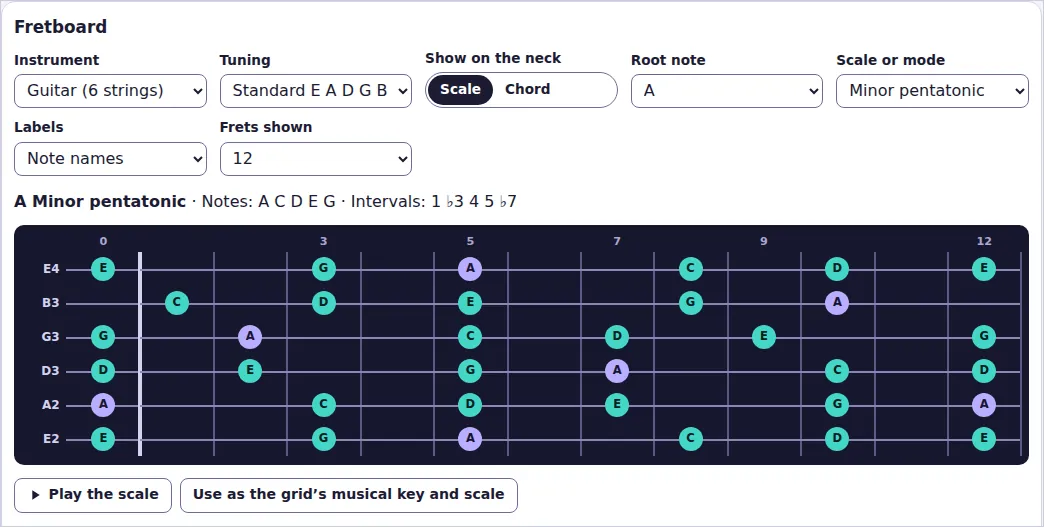
- Pick a Root note and a Scale or mode, for example A and Minor pentatonic.
- Marked frets belong to the scale; the root notes are drawn in a stronger colour.
The line above the neck spells the scale with correct note names and its intervals, for example "Notes: A C D E G · Intervals: 1 ♭3 4 5 ♭7". Switch Labels to Intervals to see the function of every note on the neck instead of its name; this is a fast way to learn where the thirds and fifths lie.
For seven-note scales, the table Chords in this key lists the chord on every degree (I, ii, iii …) with its seventh chord and notes. The play button in each row plays the chord.
Play the scale plays it upwards over one octave. Use as the grid’s musical key and scale sets the melody grid of your project to this key and scale (for the scales the grid supports).
Show a chord and its shapes
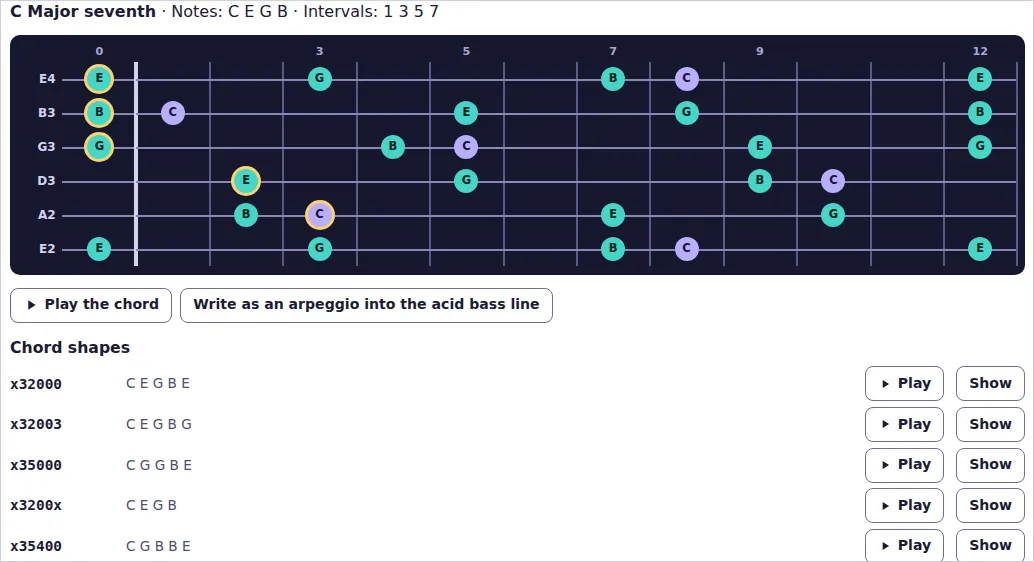
- Press Chord, then choose a Root note and a Chord type, for example C and Major seventh.
- Chord shapes lists up to six playable shapes, easiest first. A shape such as
x32000is read from the lowest string: x means not played, 0 an open string, numbers are frets. - Play strums the shape. Show marks the shape on the neck with a yellow ring; press it again to clear the marks.
Shapes are calculated, not taken from a chord book: the sounding strings form one block, the lowest note is the root, and a shape spans at most four frets and needs at most four fingers.
Write as an arpeggio into the acid bass line turns the chord into a repeating arpeggio in the bass line of the current pattern (you need an acid bass track for this; see the Acid bass tutorial).
Name a chord
Under Name a chord, type the notes from the lowest, for example E G C or C E G B, and press Name the chord (or Enter). Tonegrid answers, for example, "These notes form Cmaj7." and shows the chord on the neck. If the lowest note is not the root, the name includes it after a slash, like C/E.
Keyboard use
Press Tab to reach the neck, then use the arrow keys: left and right move along a string, up and down move to the neighbouring string. Home jumps to the open string, End to the last fret. Enter or Space plays the note. Each fret is read as, for example, "String 5 (A2), fret 3: C, Minor third".
Ready to try it?